



Material master is the most referenced master data object in SAP S/4HANA, touched by procurement, inventory, production, and finance. It serves as the central repository of product information, ensuring that the same material is consistently defined and processed across business functions. From creating purchase requisitions and purchase orders to posting goods movements and managing inventory valuations, material master data plays a critical role in day-to-day operations.
Because of its broad impact, proper material master configuration is essential for maintaining data accuracy, process efficiency, and reporting reliability. Understanding how material master views, number ranges, and related configuration settings work a foundational step in any SAP S/4HANA Public Cloud implementation.
Material Type Determines Everything
A Material Type is a classification that defines the purpose and behavior of a material within SAP. It controls how a material is used in business processes, which views are available for maintenance, how the material is numbered, and how inventory and accounting transactions are processed.
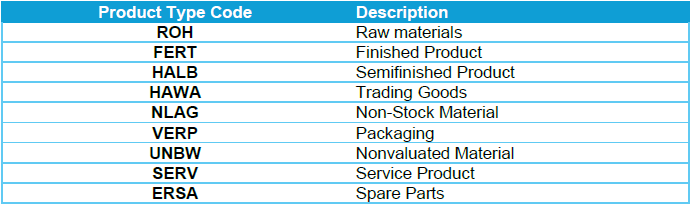
In SAP S/4HANA Public Cloud, the available material types can vary slightly by scope items and activated business processes, but the common standard material types are:
Loading Material Master at Go-Live
Material master records are loaded via SAP Migration Cockpit using the pre-built Material migration object. Number ranges must be configured before the first mock migration run as material numbers cannot be reassigned after goods movements are posted against them.